Ken Ciolek

Lab: Veeam Backup & Replication 13.1: Simplifying Deployments with the Veeam Software Appliance and Storage Integrations

One of the things I enjoy most about every Veeam release is seeing how it continues to simplify day-to-day administration. While the headline features often get the most attention, it’s usually the enhancements that streamline deployments, improve integrations, and reduce operational complexity that deliver the greatest value to customers. As someone who spends much of […]

Lab: Veeam Backup & Replication 13.1: Simplifying Deployments with the Veeam Software Appliance and Storage Integrations Read More »

Lab: Upgrading Veeam Backup & Replication from 13.0.2.29 to 13.1.0.411: A Hands-On Lab Experience

With the release of Veeam 13.1, I couldn’t wait to upgrade my lab environment and see how the new update process worked firsthand. When a new Veeam release becomes available, one of the first things I do is upgrade my lab before recommending it to customers. Working in the SHI Customer Innovation Center (CIC), our

Lab: Upgrading Veeam Backup & Replication from 13.0.2.29 to 13.1.0.411: A Hands-On Lab Experience Read More »

LAB Testing: Veeam Backup & Replication 13.1 BETA Security Features Deep Dive (‘Why Now?’ Community Challenge for Veeam Data Platform 13.1)

A Hands-On Look at the Next Generation of Cyber Resilience Every time I get access to a new Veeam BETA release, I have the same routine. I spin it up in the lab, build out a realistic customer environment, and start testing. While new platform support and performance improvements are always exciting, the first area

LAB Testing: Veeam Backup & Replication 13.1 BETA Security Features Deep Dive (‘Why Now?’ Community Challenge for Veeam Data Platform 13.1) Read More »

Lab: Hands-On with Veeam Backup & Replication 13.1 BETA: Installation, Configuration, and Lab Testing

There’s always something exciting about getting access to a new Veeam beta release. As someone who spends most of my time in the lab testing new features before customers deploy them, I couldn’t wait to spin up Veeam Backup & Replication 13.1 Beta and see what it brings. Rather than simply reading the release notes,

Lab: Hands-On with Veeam Backup & Replication 13.1 BETA: Installation, Configuration, and Lab Testing Read More »

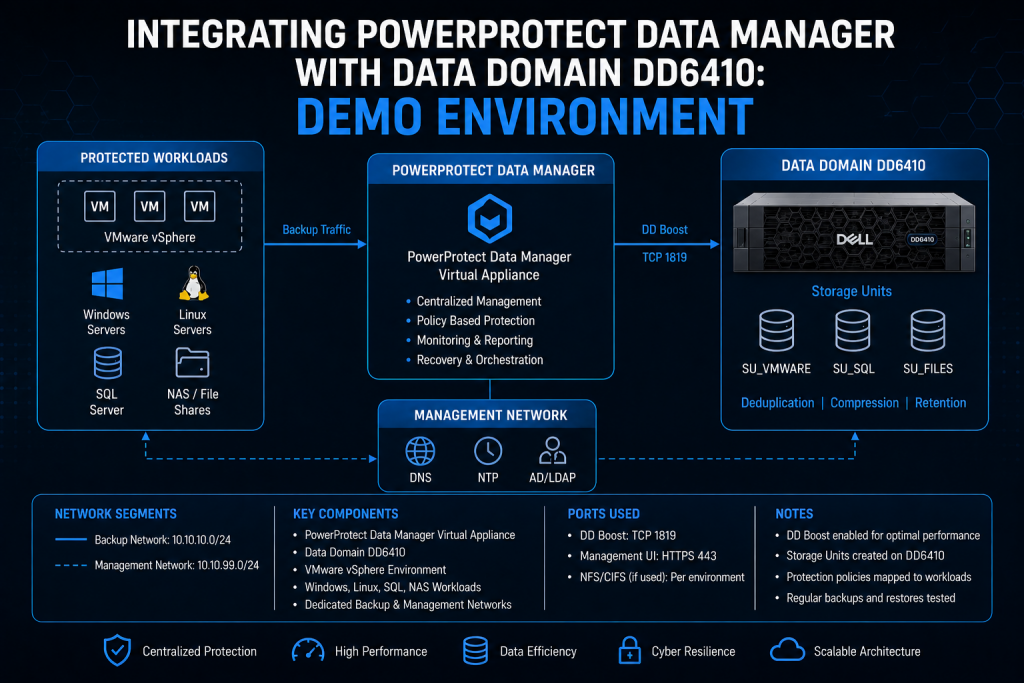
Lab: Integrating PowerProtect Data Manager with Data Domain DD6410: Demo Environment

In my lab, I spent time integrating PowerProtect Data Manager with a Data Domain DD6410 to better understand deployment flow, configuration requirements, and real-world operational behavior. The process was straightforward overall, but there are several things worth validating immediately after deployment to avoid performance or retention problems later.

Lab: Integrating PowerProtect Data Manager with Data Domain DD6410: Demo Environment Read More »

Installing the Veeam Plug-in for HPE VM Essentials v13 (RTM) on my Veeam Lab Server

I recently deployed the Veeam Plug-in for HPE Morpheus VM Essentials version 13 (RTM) on my Veeam Backup lab server, which is running v13.0.1. Once tested, I’ll have it available to demonstrate to my customers. Veeam has introduced a dedicated plug‑in that enables image‑level backup and restore for virtual machines running on HPE VM Essentials.

Installing the Veeam Plug-in for HPE VM Essentials v13 (RTM) on my Veeam Lab Server Read More »

Lab Deployment: Deploying a Scale-Out Backup Repository (SOBR) for Backup Environments

In this article I’m going to walk you through deploying a SOBR from scratch in my lab environment — not just the wizard clicks, but the design decisions, the gotchas, and the things I wish I’d known the first time I built one at scale. In recent years, before Veeam introduced direct-to-cloud capabilities, SOBR was

Lab Deployment: Deploying a Scale-Out Backup Repository (SOBR) for Backup Environments Read More »